Trade
Trading in the game allows you to transfer gold and items between characters. The following rules apply:
- Changing items in a transaction
If someone adds or removes items, the transaction must be re-approved. - Time Limit
Each user can make transactions no more than once every 5 minutes. After completing a transaction with one player, trading with others will be unavailable for the next 5 minutes. - Transaction History
A maximum of 30 recent transactions are stored. - Lack of gold
If a character does not have enough gold to transfer when completing a transaction, the transaction will not be completed. - Items in a transaction
If an item of equipment is missing or is on the character when the transaction is completed, the transaction will also not be completed.
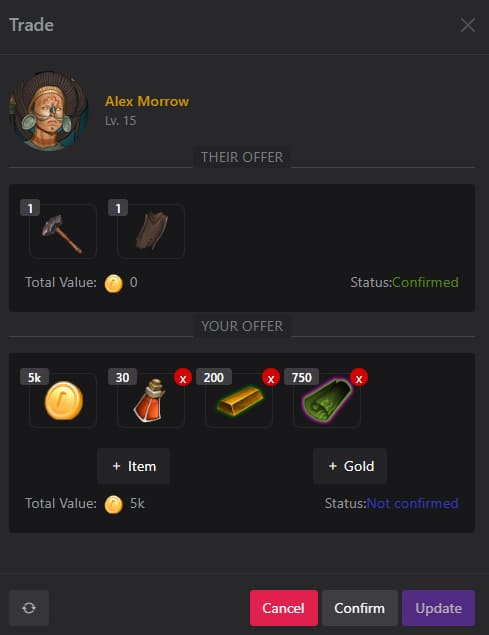
To start a trade, go to the profile of the desired character and click the Trade button. In the window that opens, you can view the history of previous trades with this character or create a new one by clicking New Trade.
To create a new trade, add gold or items and click Send. If you are ready to finalize the trade, confirm it by clicking Confirm.
If you are expecting other equipment or gold in exchange, wait for the other character to add the required items before confirming the trade.
Trading opens up great horizons for developing the economic aspects of your characters - don't miss this opportunity!